A meal planning app should take a job you already do — deciding what to eat this week and buying the food for it — and make it shorter. That sounds obvious, but many apps add work instead: they plan around their own recipe catalogue rather than yours, they make you copy ingredients into a separate list, or they only work on the phone that happens to be in the other room.
This page is a checklist. It covers what a meal planning app should do, what you can skip, and how a week of planning looks once the app is set up. ChefBook, mentioned along the way, is this site’s own app; the checklist works for judging any of them.
What a meal planning app has to do
Before features, the basics. A planner that fails one of these will be abandoned by the second week, however clever the rest is.
| Must have | Why it matters | How to test it in five minutes |
|---|---|---|
| Your own recipes | You plan what you actually cook, not what the app sells | Add a recipe from a food blog link and one you type in |
| A simple week view | You need to see seven days at a glance | Fill three dinners and look at the week |
| A list that writes itself | Copying ingredients by hand is the step people skip | Send one planned recipe to the grocery list |
| Works where you plan | Planning happens at a desk; shopping happens in a shop | Open the same plan on your phone and on a computer |
| Works offline | Supermarkets have bad signal | Turn on airplane mode and open the list |
Your own recipes come first
The recipes you cook every week live in many places: bookmarked blog posts, Instagram saves, a cookbook, a card from a parent. A meal planning app that only plans from its own catalogue forces you to cook its recipes or give up on the plan.
Look for an app that imports from the places you already save recipes. In ChefBook you paste a link from a recipe website, Instagram, TikTok, YouTube, Pinterest or Facebook, or photograph a cookbook page or a handwritten card, and it becomes a clean recipe you can plan with. Importing is free up to a weekly allowance; Premium makes it unlimited. Get ChefBook free and try it with the recipe you cooked last night.
A week view you can fill in a few minutes
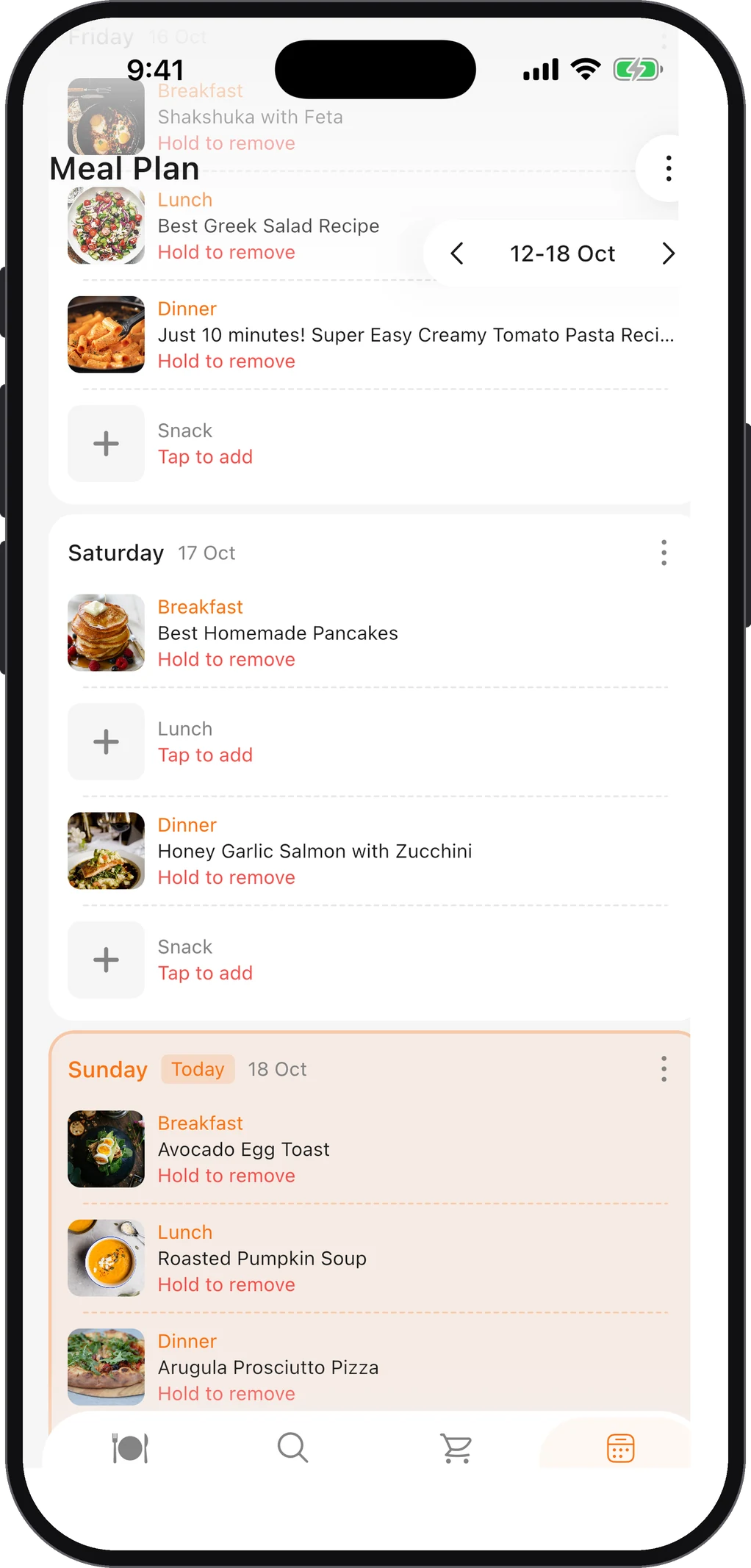
Planning is a grid: seven days, a few meals a day. The app should show that grid and let you fill a slot by searching your recipes from inside it, without jumping between screens. ChefBook’s weekly planner has breakfast, lunch, dinner and snack slots for every day, and you move between weeks to plan ahead or look back at what worked.
You don’t need to fill every slot. Most households plan dinners and leave the rest flexible — the beginner’s guide to weekly meal planning explains why starting with four or five dinners is enough.
The meal planning app feature that saves the most time: the grocery list
The plan is the easy half. The time goes into the shopping list: reading every recipe, writing down every ingredient, noticing that two recipes both need onions.
A good meal planning app turns the plan into a list in one step. In ChefBook, one tap sends a recipe, a day or the whole week’s ingredients to the grocery list. Items arrive grouped under the recipe they belong to, you can sort them A–Z instead, tick them off as you shop and filter to what’s left. If you want the manual version of this — useful even with an app — see how to make a grocery list, and for the recipe-to-list step itself, the guide on turning a recipe into a grocery list.
Test this before you commit to any app: plan three dinners, send them to the list, and check that nothing needs retyping.
A meal planning app for your phone and your computer
Here is the requirement most comparisons skip. Planning usually happens sitting down — on a laptop, with a calendar open and time to think. Shopping happens standing up, with a phone in one hand and a basket in the other. If the app lives only on the phone, you plan on a small screen; if it lives only in a browser, you shop from a screenshot.
ChefBook works on both. The app is free on iPhone, iPad and Android, and the same account works in a web browser: sign in at chefbook.net and the meal plan and grocery list are the same ones as on your phone, kept in sync both ways. Plan the week on your computer on Sunday, and the list is already on your phone when you reach the shop. The home-screen widgets for today’s menu and the shopping list are on iPhone only.
Nice to have, not essential
Some features help, but don’t choose an app on them alone:
- Ideas when you’re stuck. ChefBook’s free “What Should I Cook?” lets you tick the ingredients you have and ranks recipes by how many of them match. It’s plain matching, not AI. The guide on what to make for dinner shows it step by step.
- Scaling. Changing the servings should recalculate quantities. In ChefBook that’s free.
- Nutrition. Calories, protein, carbs, fat, fibre and sugar per serving are useful if you track them; in ChefBook they are a Premium feature.
What you can skip
Many apps sell meal plans written by someone else. They are fine for a diet with fixed rules, but for everyday cooking they tend to fail the same way: the plan doesn’t fit your week, your budget or your family’s tastes, and you stop opening the app. If you already have ten dinners you like, a planner built around your recipes will last longer than a catalogue of new ones. A dinner rotation of those ten is often all the plan you need.
How a week looks once it’s set up
- Sunday, ten minutes, on the computer. Open the planner, fill four or five dinners from your saved recipes, add a lunch or two.
- Send the week to the list. One tap; the ingredients arrive grouped by recipe.
- Check the cupboard. Delete what you already have from the list.
- Shop from your phone. Tick items off; filter to what’s left.
- Cook. Open the recipe from the plan; change the servings if you’re cooking for more people.
Do it with ChefBook
ChefBook keeps your recipes, your weekly plan and your grocery list together. Save recipes from any link or a photo, drop them into the week, and send the week to a grocery list grouped by recipe — on your phone, or in a browser at chefbook.net with the same account. The planner and the grocery list are free. Download ChefBook free and plan next week tonight.
Questions people ask
Is there a free meal planning app?
Yes. In ChefBook the weekly planner and the grocery list are free, on iPhone, iPad and Android and in a web browser. Premium adds tools such as Cook Mode, Ask Chef, nutrition and translation; free accounts get 5 uses of those a week.
Can I use a meal planning app on my computer?
Some apps are phone-only. ChefBook works in a browser at chefbook.net: sign in with the same account and you see the same plan and grocery list as on your phone, synced both ways.
Can a meal planning app make my grocery list?
That’s the main thing to look for. In ChefBook one tap sends a recipe, a day or the whole week to the grocery list, grouped under each recipe.
Can I use my own recipes in a meal planning app?
You should be able to. ChefBook imports recipes from website links, social media links, photos of cookbook pages or handwritten cards, and pasted text, so the plan is built from what you already cook.
Keep every recipe in one place
ChefBook is free on the App Store and Google Play — save your first recipe today.
phone camera