 ChefBook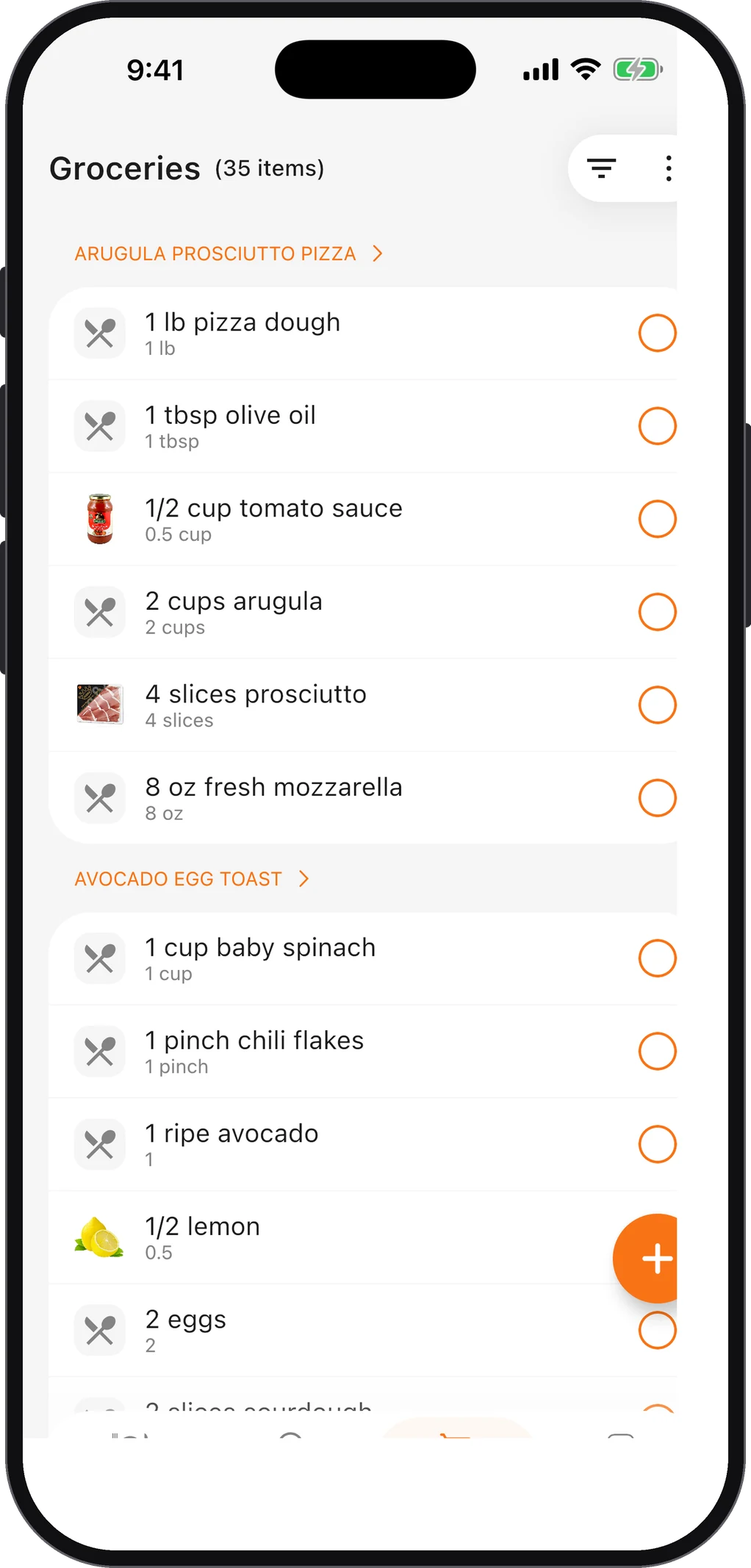
Knowing how to make a grocery list properly is one of those dull skills that quietly saves hours and money every month. A good list means one trip instead of two, no duplicate jars of cumin, and no standing in the aisle trying to remember what Thursday’s recipe needed.
Most bad lists fail for the same reason: they are written in the kitchen from memory, rather than from a plan. Here is the five-step version.
Step 1: Decide the meals before you write a single item
A grocery list is the output of a meal plan, not a replacement for one. Before anything else, decide:
- Which dinners you will cook this week (five is a realistic number).
- Breakfasts and lunches, even if it is just “oats” and “sandwiches”.
- Snacks and anything for guests or packed lunches.
If you skip this step, the list becomes a list of things you usually buy, which is exactly how fridges fill up with food nobody cooks. The weekly meal planning guide covers a 20-minute Sunday routine for this.
Step 2: Write every ingredient from every recipe
Go through each recipe and write down every ingredient with its quantity. Do not skip the small things — garlic, lemons, stock cubes, oil — because those are what send you back to the shop.
Step 3: Combine duplicates
Now merge. If Monday’s curry needs one onion and Wednesday’s bolognese needs two, the list says 3 onions, not “onion” twice. This step is where most handwritten lists go wrong, and where buying too much or too little creeps in.
This is also the step that makes a recipe app worthwhile. In ChefBook, the meal planner sends every planned ingredient to the grocery list in one tap, and items stay grouped by recipe so you can see why each one is there. The guide on turning a recipe into a grocery list shows the whole flow.
Step 4: Cross off what you already have
Take the list to the kitchen and check the fridge, freezer and cupboards. Cross off what you have enough of. Note anything that is nearly finished (oil, salt, rice) and add it.
While you are there, look for food that needs using soon and think about whether it can replace something on the list. If you have a bag of spinach that needs eating, maybe it goes into the pasta instead of buying courgettes. What Should I Cook is useful here: tell it what’s in the fridge and it ranks recipes by how well they match.
Step 5: Sort the list by store section
The final step is the one that makes the shop fast. Rewrite or reorder the list in the order you walk the shop:
| Section | Examples |
|---|---|
| Fruit and vegetables | Onions, garlic, lemons, salad, potatoes |
| Bakery | Bread, wraps |
| Meat and fish | Chicken thighs, mince, salmon |
| Dairy and eggs | Milk, yoghurt, cheese, butter, eggs |
| Tins, jars and dry goods | Tomatoes, beans, pasta, rice, stock |
| Spices and baking | Cumin, flour, sugar |
| Frozen | Peas, spinach, ice cream |
| Household | Washing-up liquid, bin bags |
Grouping by aisle means you walk the shop once, without doubling back. Frozen goes last so it stays cold.
A grocery list template you can copy
PLAN: Mon curry · Tue leftovers · Wed bolognese · Thu omelette · Fri pizza

FRUIT & VEG     onions x3, garlic, spinach 200 g, lemons x2, potatoes 1 kg
BAKERY          wraps, sliced bread
MEAT & FISH     chicken thighs 600 g
DAIRY & EGGS    eggs x6, yoghurt 500 g, cheddar
CUPBOARD        chopped tomatoes x2, lentils, pasta, rice
FROZEN          peas
CHECK AT HOME   oil, salt, cumin, stock cubes
The “check at home” line is for staples you think you have but aren’t sure about — it is quicker to check than to buy a third bottle of soy sauce.
Paper, notes app or recipe app?
All three work; what matters is the method.
- Paper is fast and never runs out of battery, but you rewrite it every week.
- A notes app lets you keep a reusable template of staples, but you still combine duplicates by hand.
- A recipe app with a grocery list builds the list from the recipes, so steps 2 and 3 disappear. In ChefBook you can sort the list by name or by recipe, check items off as you shop and filter to what’s left. On iPhone, the Groceries widget puts the list on your home screen.
Common grocery list mistakes
- Writing it from memory instead of from a plan.
- Vague items like “veg” or “something for lunch”.
- No quantities, so you buy one pepper when the recipe needed three.
- Not checking the cupboard, then buying duplicates.
- Shopping hungry, which no list can fix.
For budget-focused tips, see how to meal plan on a budget; for stopping what you buy from going off, see how to reduce food waste at home.
Questions people ask
What is the best way to make a grocery list?
Plan your meals first, write every ingredient with quantities, combine duplicates, cross off what you already have, then sort the list by store section.
How do you organize a grocery list by aisle?
Group items into the sections of your usual shop — produce, bakery, meat and fish, dairy, cupboard, frozen, household — and order them in the route you walk, with frozen last.
Should a grocery list include quantities?
Yes. “Onions” and “3 onions” lead to different shops. Quantities stop you under-buying for a recipe or over-buying something that goes off.
Is there an app that makes a grocery list from recipes?
Yes — several recipe apps do. ChefBook builds the list from the recipes and meal plans you choose, grouped by recipe; see the recipe-to-grocery-list guide.
Keep every recipe in one place
ChefBook is free on the App Store and Google Play — save your first recipe today.
phone camera