 ChefBook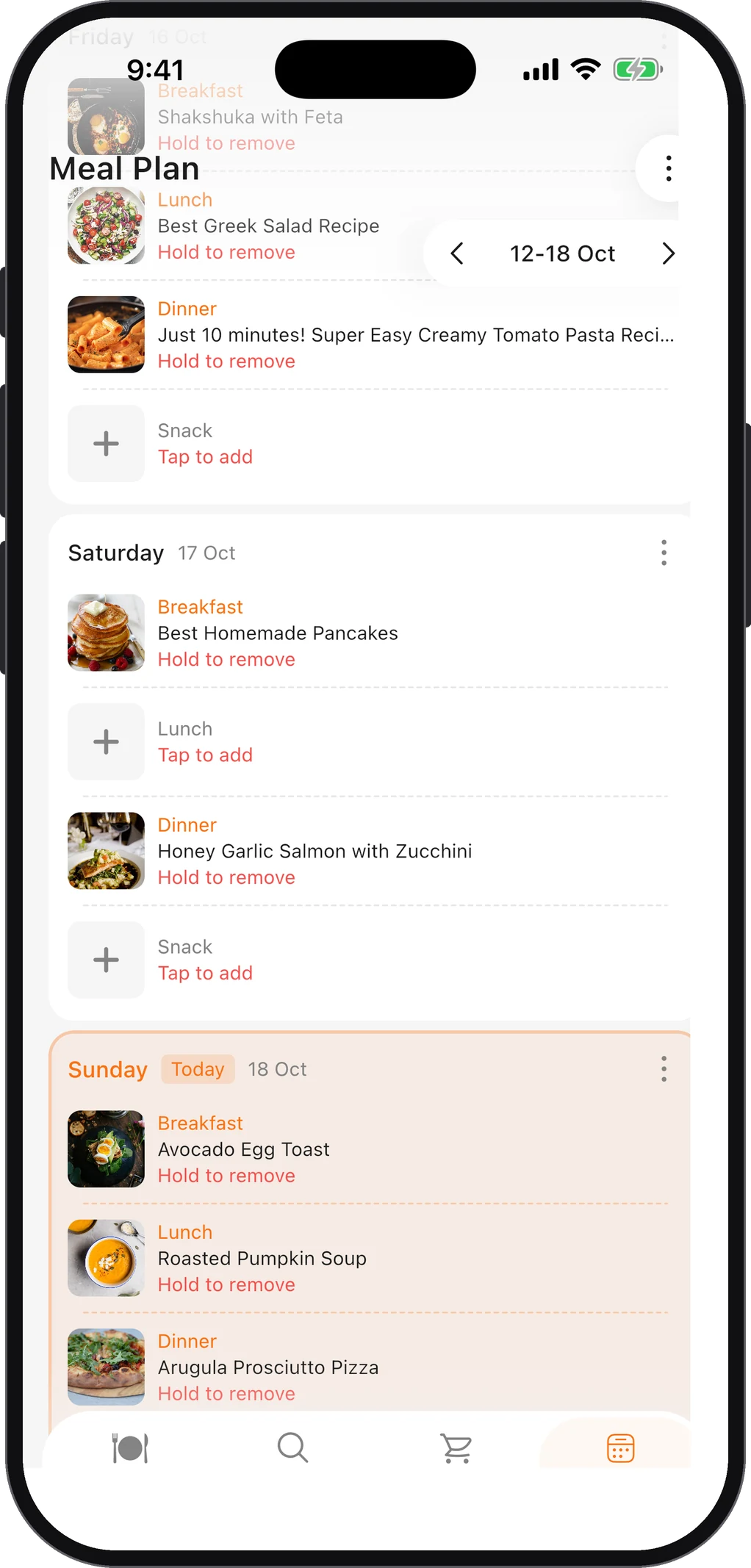
If you’re searching for a Yummly alternative, you probably had a collection there: recipes you’d saved, a few you cooked every week, maybe a shopping list or two. Here’s what happened, what to look for in a replacement, and how to rebuild a recipe collection that you won’t lose the next time an app closes.
What happened to Yummly
Yummly was a recipe search and recommendation app, bought by the appliance maker Whirlpool in 2017. In April 2024 Whirlpool laid off the Yummly team, and the app and website were shut down on 20 December 2024 (The Spoon reported the layoffs; Wikipedia records the closure). For users, that meant the saved recipes, collections and shopping lists inside the app went away with it.
The lesson most former users took from it is a fair one: a recipe collection that only exists inside one company’s app is only as safe as that company’s plans.
What Yummly users actually need from a replacement
People used Yummly for different things, so it helps to be specific about which job you’re replacing.
1. A place to keep recipes from anywhere
Yummly’s “Yum” button saved recipes from across the web. The replacement should be able to save a recipe from any website, not just from its own catalogue, and ideally from social media too, since that’s where many recipes come from now.
What to check: can you paste any recipe link and get the full ingredients and method, not just a bookmark?
2. Recipes you can edit
A saved link is not the same as a saved recipe. You want your own copy, which you can correct, annotate (“use half the chilli”) and keep even if the original site disappears.
What to check: after you save a recipe, can you edit the ingredients and steps?
3. Meal planning and a shopping list
Many people used Yummly to plan the week’s dinners and shop for them. The replacement should take you from “these are the recipes” to “this is what to buy” without retyping.
What to check: can a recipe, or a whole week of planned recipes, go straight to a grocery list?
4. Ideas when you don’t know what to cook
Yummly was built around recommendations. If that’s what you miss most, look for a way to discover recipes, and a way to find recipes based on the ingredients you already have.
5. A way out
After December 2024, this one matters more than it used to. Check whether you can get your recipes back out of an app, or at least whether your recipes are stored as full text you can copy, rather than links into the app’s own database.
How ChefBook covers those jobs
ChefBook is a recipe keeper, meal planner and grocery list in one app, on iPhone and Android. Measured against the list above:
- Saving from anywhere: paste a link from any recipe website into Import from web, or a link from Instagram, TikTok, YouTube or Pinterest into the social media import. You can also photograph a recipe card or paste text. See how to import a recipe from a website URL.
- Your own copy: every recipe is a full, editable recipe with ingredients, steps, times and servings, organized into cookbooks you create.
- Planning and shopping: a weekly meal planner with breakfast, lunch, dinner and snack slots, and one tap to send the planned ingredients to a grocery list grouped by recipe.
- Ideas: a Discover feed of public recipes from the community, and What Should I Cook, which ranks recipes by how well they match the ingredients you have. It’s free and it’s ingredient matching, not AI.
- Cost: ChefBook is free to use. Some features are Premium (Cook Mode, timers, Ask Chef, nutrition, translation and PDF export), and free accounts get 5 uses of Premium features a week.
Other recipe apps cover some or all of these jobs too. Whichever you choose, use the five checks above before you move years of recipes into it.
How to rebuild your collection
If your Yummly recipes are gone, you can usually rebuild the ones that mattered, because most of them came from other websites in the first place.
- Make a list from memory. Write down the ten or twenty recipes you actually cooked. That’s your real collection. The other four hundred saves were a wish list.
- Search for each one by name and source. “Lemon chicken orzo” plus the blog name usually finds the original page.
- Use the Wayback Machine for the ones that vanished. The Internet Archive keeps copies of many recipe pages. Paste the old link in and pick an older capture.
- Import each recipe as you find it. Save the full recipe this time, not a link. In ChefBook, paste the page address into Import from web.
- Group them as you go. A few cookbooks like “Weeknights”, “Baking” and “Guests” are easier to live with than one long list.
Rebuilding twenty recipes takes an evening. Then plan next week from your own library, and you’re back where you were, with a collection that’s yours this time.
Questions people ask
Is Yummly coming back?
The app and website were shut down in December 2024. There’s no sign of a relaunch, so it’s safest to treat the old collection as gone and rebuild elsewhere.
Can I recover my Yummly saved recipes?
Not from Yummly itself now that it’s offline. The practical route is to find the original recipes on the websites they came from, using the steps above.
What is the best free Yummly alternative?
It depends on which part of Yummly you used. If you mostly saved and cooked recipes, prioritize importing from any website and editing your copies. If you mostly planned meals, prioritize the planner and grocery list. ChefBook is free to download and covers both, with some features on Premium.
Keep every recipe in one place
ChefBook is free on the App Store and Google Play — save your first recipe today.
phone camera