 ChefBook
So you paste it into a general translation tool, and it hands you back something that says "put the flour into the shape" and cheerfully mistranslates every ingredient that has a culinary meaning different from its dictionary one.
Why generic translation mangles recipes
- Ingredients are false friends. Cooking vocabulary is full of words that mean something else entirely outside the kitchen.
- Units and formats get lost. Weights, oven temperatures and cup measures come out inconsistent or missing.
- Structure collapses. You get a blob of prose rather than an ingredient list and numbered steps.
- It is not saved. You translated it in a browser tab; next week the tab is gone and so is the recipe.
How to do it in ChefBook
- Import the recipe in its original language. Paste the URL, paste the text, or photograph the page. ChefBook does not need it to be in your language to read it.
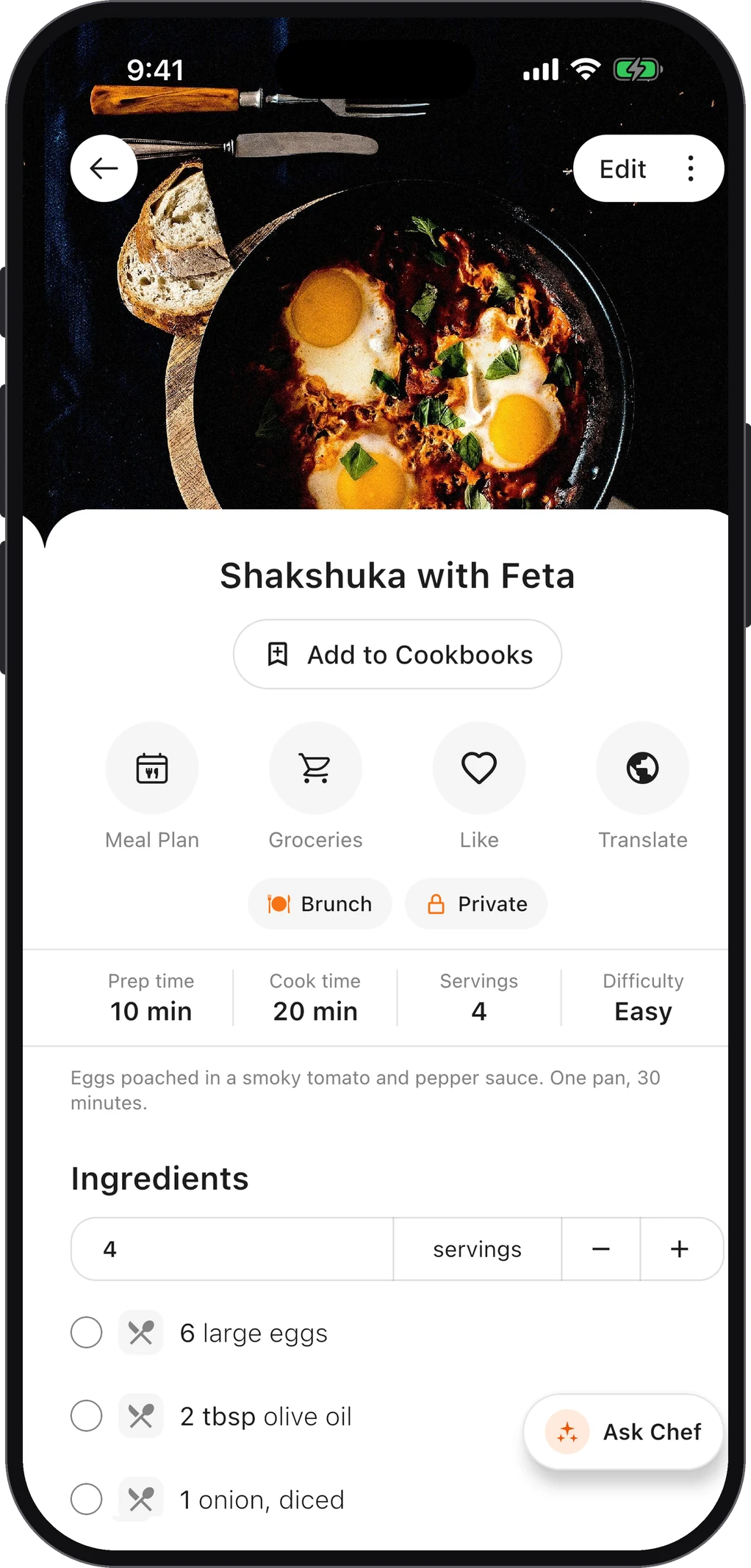
- Tap Translate (Premium). One tap on the recipe converts it into your language — title, ingredients and instructions together, keeping the structure intact. Translation is a Premium feature; free accounts get 5 uses of Premium features a week.
- Get the ingredients translated properly. Ingredient names and cuisine terms are translated as cooking terms, not as dictionary words, so you end up with something you can actually shop for.
- Use the app in your language too. ChefBook itself runs in English, Turkish, Russian, Spanish, German, French and Portuguese, so the whole app matches the recipe rather than sitting awkwardly around it.
- Save it, and it stays translated. The translated recipe lives in your library, offline, ready to cook — and it can go to your meal plan and grocery list like any other.
This works in both directions. Cooking your family's recipes for someone who does not read the original language? Translate them and share the cookbook — the recipes travel further than the family does.
How to translate a recipe on your phone without a recipe app
You can get a usable translation with the tools already on your phone. It takes a few minutes per recipe, and the checking is the part that matters:
- Get the text in. For a web page, use your browser's translate option or copy the ingredients and method into a translation app. For a printed cookbook or a handwritten card, use the camera mode in Google Translate or the Camera tab in Apple's Translate app.
- Translate the ingredients and the method separately. Short lines translate better than one long block, and you can see at once which ingredient came out strange.
- Check every ingredient against the list below. Abbreviations and baking ingredients are where literal translation goes wrong, and a wrong raising agent ruins a cake quietly.
- Convert the units last. Most of the world cooks in grams, millilitres and °C. If you cook in cups and °F, the guide to converting European recipes to American measurements has the tables.
- Save the result somewhere you will find it. A translated recipe left in a browser tab is gone by next week. Paste it into your notes, or keep it in a recipe app.
If something has no equivalent where you live, the ingredient substitutions chart covers the common swaps.
Recipe words that translate badly
These are the terms that most often come out wrong or untranslated. Look for them before you start cooking:
- EL / TL (German) — Esslöffel and Teelöffel: tablespoon and teaspoon. A translator may leave the abbreviations as they are.
- c. à s. / c. à c. (French) — cuillère à soupe and cuillère à café, literally "soup spoon" and "coffee spoon": tablespoon and teaspoon.
- yemek kaşığı / çay kaşığı (Turkish) — literally "food spoon" and "tea spoon": tablespoon and teaspoon.
- ст. л. / ч. л. (Russian) — столовая ложка and чайная ложка: tablespoon and teaspoon.
- levure chimique (French) — literally "chemical yeast": baking powder. Plain levure or levure de boulanger is yeast.
- Backpulver / Natron (German) — baking powder and baking soda. They are not interchangeable.
- fermento químico (em pó) / fermento biológico (Portuguese) — baking powder and yeast. Both are often shortened to just "fermento"; the kind of recipe tells you which.
- harina de fuerza (Spanish) — literally "strength flour": strong bread flour.
- q.b. (Italian) — quanto basta, "as much as is enough": to taste.
- творог (Russian) — often translated as "cottage cheese", but it is a drier, crumblier fresh curd cheese, closer to farmer's cheese or quark.
The recipes you can now reach
Being able to read any recipe quietly widens what you cook. The English-language internet is a small and repetitive slice of the world's food, heavily optimised for search rankings; the good stuff is frequently written by people cooking in their own language with no interest in ranking at all.
Once language stops being a barrier, the whole thing opens up — and the ingredient list still makes sense when you get to the shop.
A recipe translation app that keeps the recipe
The manual method works, but you redo it for every recipe and the result is loose text. In ChefBook the recipe is imported first — from a website link, pasted text, or a photo of a cookbook page or a handwritten card — so it is already split into ingredients and steps. Translate (Premium) then converts the title, ingredients and steps together. The translated recipe stays in your library, opens offline, and can go to your meal plan and grocery list. Get ChefBook free on iPhone, iPad or Android.
Questions people ask
How do I translate a recipe to English?
Translate the ingredients and the method separately with your browser's translate option or a translation app, then check abbreviations and baking ingredients by hand and convert grams and °C if you cook in cups and °F. In ChefBook, import the recipe and translate it into English with Translate (Premium) — ingredients and steps together.
How do I translate cooking instructions?
Translate the method one step at a time rather than as one block, so each instruction keeps its own line and you can spot the one that came out odd. Then check the verbs and terms that have a kitchen meaning — "fold", "cream", "reduce", "to taste" (q.b., nach Geschmack) — against the list of recipe words that translate badly. In ChefBook, Translate (Premium) keeps the steps numbered and in order.
Can I translate a recipe from grams to cups?
That is a unit conversion rather than a translation, and translators leave the numbers alone. Convert after you translate: weights by ingredient (a cup of flour and a cup of sugar weigh different amounts) and oven temperatures from °C to °F. The tables are in how to convert a European recipe to American measurements.
Can I translate a recipe from a photo?
Yes. The camera mode in Google Translate or Apple's Translate app reads a printed page. To keep the recipe, import the photo into ChefBook — its AI reads cookbook pages and handwritten cards — and translate it there.
Is recipe translation free in ChefBook?
Translation is a Premium feature. Free accounts get 5 uses of Premium features a week, so you can translate a few recipes without paying. Importing and saving recipes is free up to a weekly allowance. Download the app free to try it.
Which languages can ChefBook translate a recipe into?
The seven languages the app runs in: English, Turkish, Russian, Spanish, German, French and Portuguese.
Do this in about a minute
ChefBook is free on the App Store and Google Play — save your first recipe today.
phone camera