 ChefBook
A social bookmark is not a recipe. It is a pointer to a video that you cannot search by ingredient, cannot scale to six servings, cannot read while your hands are covered in flour, and cannot turn into a shopping list. When Sunday comes and you need to feed people, scrubbing through a saved folder is so much friction that you order takeaway instead.
Why saved recipes never get cooked
- They are not searchable. You remember it had gochujang in it. Instagram cannot find that; it only knows the caption.
- They are split across apps. Some are in Instagram, some in TikTok, some screenshotted, some texted to you. There is no single place that answers "what could I cook tonight?"
- They are not cookable. Ingredients are read aloud at speed over music, or buried in a comment. You cannot follow that at the hob.
- They do not shop for you. A video cannot add pork shoulder to a grocery list.
How to do it in ChefBook
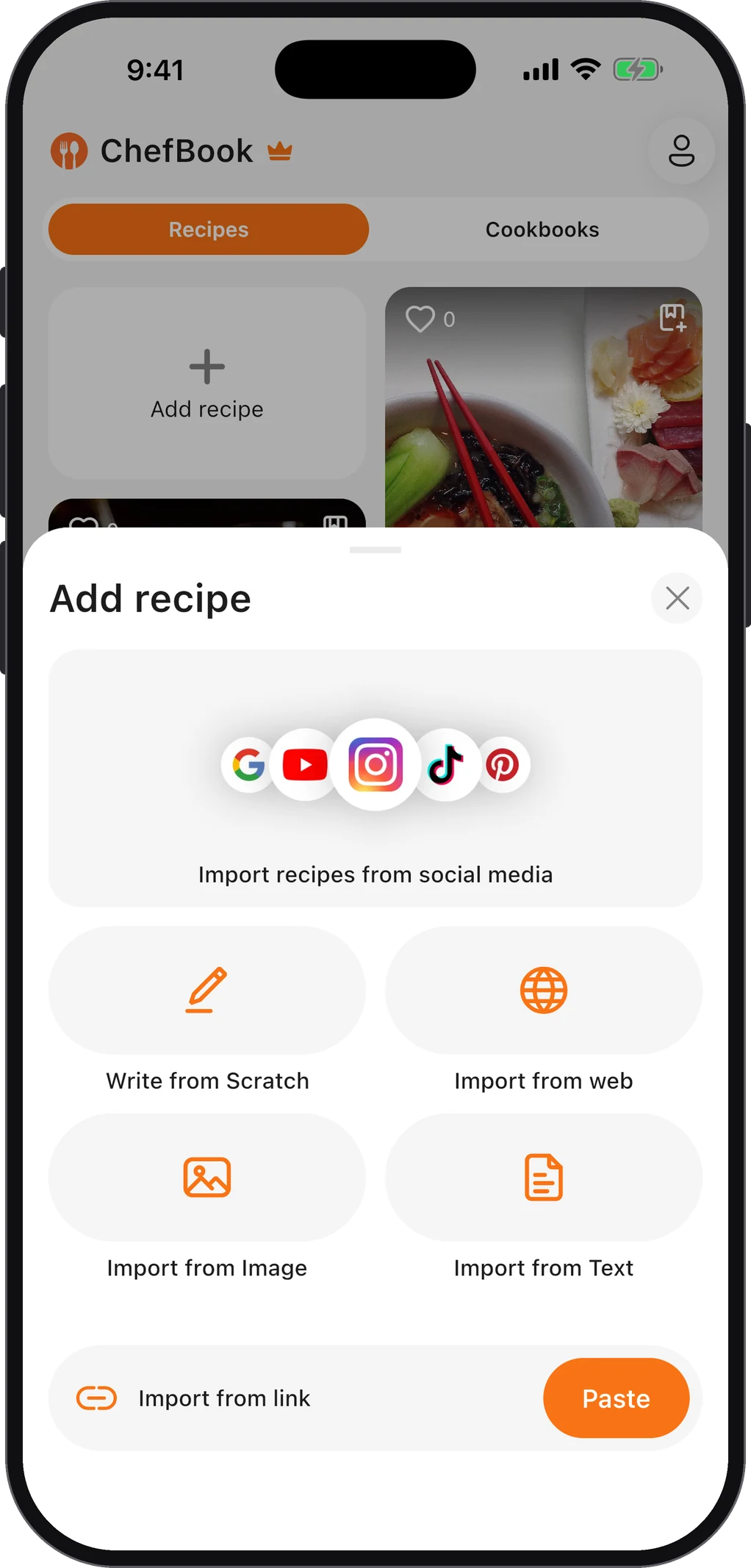
- Copy the link to the post. In Instagram, TikTok, YouTube or Pinterest, tap Share and then Copy Link. That link is all ChefBook needs — you do not need to type anything out.
- Paste it into ChefBook's import. Open ChefBook, tap import and paste the URL. ChefBook reads the post and pulls out the ingredients and the method, building a clean, structured recipe.
- Let AI fill any gaps. Creators often skip quantities or leave steps in the caption. Turn on AI Completion and ChefBook proposes the missing quantities and steps, which you can edit before saving.
- File it in a cookbook. Drop it into a collection — Weeknight Dinners, Baking, Things To Try — so it surfaces when you actually want it, rather than disappearing down an infinite feed.
- Cook it, finally. Open Cook Mode (Premium) for full-screen steps with the screen kept awake, or send the ingredients straight to your grocery list.
If a video has no written recipe at all, screenshot the ingredient list and use ChefBook's photo import instead — the AI reads text out of images too.
How to save recipes from TikTok to your phone without an app
TikTok gives you three ways to keep a video, and your phone adds a fourth. Each one keeps something different:
- Favorites. Tap the bookmark icon on the video. It goes to the Favorites tab on your profile, and you can sort favorites into collections such as "Dinners" or "Baking" so they are not one endless grid. Interface labels move around between TikTok versions, so if you do not see collections, look under Profile → Favorites.
- Save the video to your camera roll. Tap Share, then Save video. The clip lands in Photos or Gallery and plays without TikTok. Creators can turn downloads off, and then the option is not there.
- Screenshot the ingredients. Pause on the frame that shows the list, or expand the caption and screenshot that. On an iPhone, Live Text in Photos lets you copy the words out of the screenshot; on Android, Google Lens does the same.
- Write it down. Paste the copied text into your notes app, with the video's link at the top so you can watch the tricky step again.
The first two keep the video, not the recipe: you still have to scrub through it at the stove. The last two keep the recipe, but as loose text and images that nothing on your phone can search by ingredient. That gap is what a recipe app fills — with ChefBook you paste the link and get a recipe with an ingredient list and numbered steps. Get ChefBook free on iPhone, iPad or Android.
Where TikTok recipes actually are
Before you save anything, find where the creator put the recipe. It is usually one of these:
- In the caption. Tap the caption to expand it; the quantities are often below the hashtags.
- On screen for a second. An ingredient card flashed between shots. Pause and screenshot it.
- In a pinned comment. Some creators pin the full recipe, with quantities, as the first comment.
- On the creator's website. A "recipe in bio" link usually leads to a blog post with the full recipe. Import that page instead — it is the cleanest source, and the guide to importing a recipe from a website shows how.
- Only spoken aloud. Then you will have to write it down while you watch, or let AI Completion propose the missing quantities in ChefBook and check them against the video.
Which way of saving keeps what
| Method | Keeps | Search by ingredient | Works offline | If the creator deletes the video |
|---|---|---|---|---|
| TikTok Favorites | A link to the video | No | No | Gone |
| Save video (camera roll) | The clip | No | Yes | You keep your copy |
| Screenshot | An image of the list | No | Yes | You keep your copy |
| Notes app | The text | Only by words you typed | Yes | You keep your copy |
| ChefBook | A recipe: ingredients and steps | Yes | Yes | You keep your copy |
Save TikTok recipes in ChefBook
Copy the video's link (Share → Copy link), open ChefBook and paste it into the social media import. ChefBook reads the post and builds a recipe you can edit: fix a vague "splash of soy", add the step the creator skipped, then file it in a cookbook. From there it works like any other recipe — change the servings and the quantities recalculate, add it to the weekly meal planner, or send its ingredients to the grocery list. Saved recipes open without internet, which matters in a basement kitchen or a supermarket with no signal.
Importing is free up to a weekly allowance, and Premium makes it unlimited. Cook Mode, which shows one big step per screen and keeps the screen awake, is Premium too. Download the app free and try it on the last recipe you saved.
The real win: one library, not five
Once recipes from Instagram, TikTok, food blogs and your own family cards all live in the same place, something changes. You can search by ingredient across all of them at once. You can ask What Should I Cook? and get suggestions ranked against what is actually in your fridge. You can plan a week in five minutes because everything is in one list rather than five apps.
The saved folder was never the problem. The problem was that saving is not the same as keeping.
Instagram works a little differently — captions, comment keywords, link-in-bio pages — so it has its own guide: how to save recipes from Instagram. If your camera roll is already full of recipe screenshots, here is how to sort them out.
Questions people ask
Where do saved TikTok recipes go?
Videos you bookmark go to the Favorites tab on your TikTok profile, inside any collection you picked. Videos you save with Share → Save video go to your phone's Photos or Gallery app.
How do I save a TikTok recipe to my phone without the video?
Copy the ingredients and method out of the caption or a screenshot into your notes app, or paste the video's link into ChefBook, which keeps the recipe as an ingredient list and steps instead of a clip.
Why can't I save a TikTok video?
The creator has turned downloads off for their videos. You can still add it to Favorites, screenshot the recipe, or copy the link into a recipe app.
Do saved TikToks disappear if the creator deletes them?
Favorites only point to the video, so if it is deleted or made private, it is gone from your Favorites too. A screenshot, a downloaded copy or a recipe saved in ChefBook stays on your phone.
Do this in about a minute
ChefBook is free on the App Store and Google Play — save your first recipe today.
phone camera